I am using www.ecartservices.net’s Google Base feed generator. I ran into a problem last week. I have over 5000 products in one of my store. The feed was generated fine however when I am uploading to Google Base only loads about 1000 of them. I was trying to find out what went wrong but I couldn’t figure out what order the products were uploaded to see what’s wrong with the feed file. I have just figured out that the feed generator assigns an id to every product and Google Base indexes the products in that order. So if you have the same problem find out what part of the feed file is corrupted follow these steps:
Check how many products have been uploaded successfully using Google Merchant Center’s “feed” option:
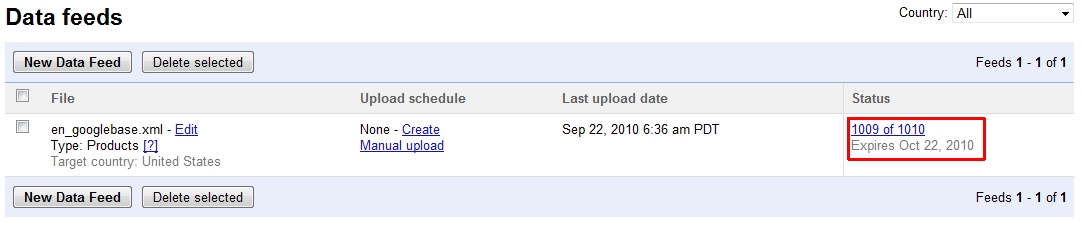
In my case 1009 products are indexed correctly. To find out what went wrong open your generated XML feed and find the relevant id.
<item>
<title>CAESARS by Caesars</title>
<g:brand>Caesars</g:brand>
<g:condition>new</g:condition>
<description><![CDATA[Gift Set — 3.3 oz Eau De Cologne Spray + 3.3 oz Body Cream + 3.3 oz Body Wash]]></description>
<g:expiration_date>2010-10-22</g:expiration_date>
<g:id>pcen-1009</g:id>
<guid>pcen-1009</guid>
<g:image_link>http://www.megaperfumeshop.com/img/p/1009-1009-large.jpg</g:image_link>
<link>http://www.megaperfumeshop.com/1009-caesars-by-caesars.html</link>
<g:price>38.4</g:price>
<g:product_type>Brands A-Z > Caesars</g:product_type>
</item>
Then see the next product:
<item>
<title>caf� by Cofinluxe</title>
<g:brand>Cofinluxe</g:brand>
<g:condition>new</g:condition>
<description><![CDATA[Parfum De Toilette Spray 3 oz]]></description>
<g:expiration_date>2010-10-22</g:expiration_date>
<g:id>pcen-1010</g:id>
<guid>pcen-1010</guid>
<g:image_link>http://www.megaperfumeshop.com/img/p/1010-1010-large.jpg</g:image_link>
<link>http://www.megaperfumeshop.com/1010-caf-by-cofinluxe.html</link>
<g:price>16.64</g:price>
<g:product_type>Brands A-Z > Cofinluxe</g:product_type>
</item>
The junk characters in the product name cause the feed import to stop and not to load products any further. Simply remove the defected products and upload the feed again. So this wasn’t the problem of the feed generator but it was a problem with the data quality. Good stuff that it can easily be fixed.